# ffmep — Free ffmpeg GUI and video converter for Mac
> A free, open-source ffmpeg GUI for Mac that feels built in: drop files in, pick a format, convert. Plus HEIC to JPG, WebP, Live Photos and background removal.
- By: TheFilip (https://thefilip.com)
- Published: 2026-09-17
- Page: https://thefilip.com/projects/ffmep
- Source: https://github.com/thefilipcom4607/ffmep
- Install: macOS 14 or later, Apple silicon. Download: https://github.com/TheFilipcom4607/ffmep/releases/download/v1.2.0/ffmep-1.2.0.dmg; Homebrew: `brew install TheFilipcom4607/tap/ffmep`
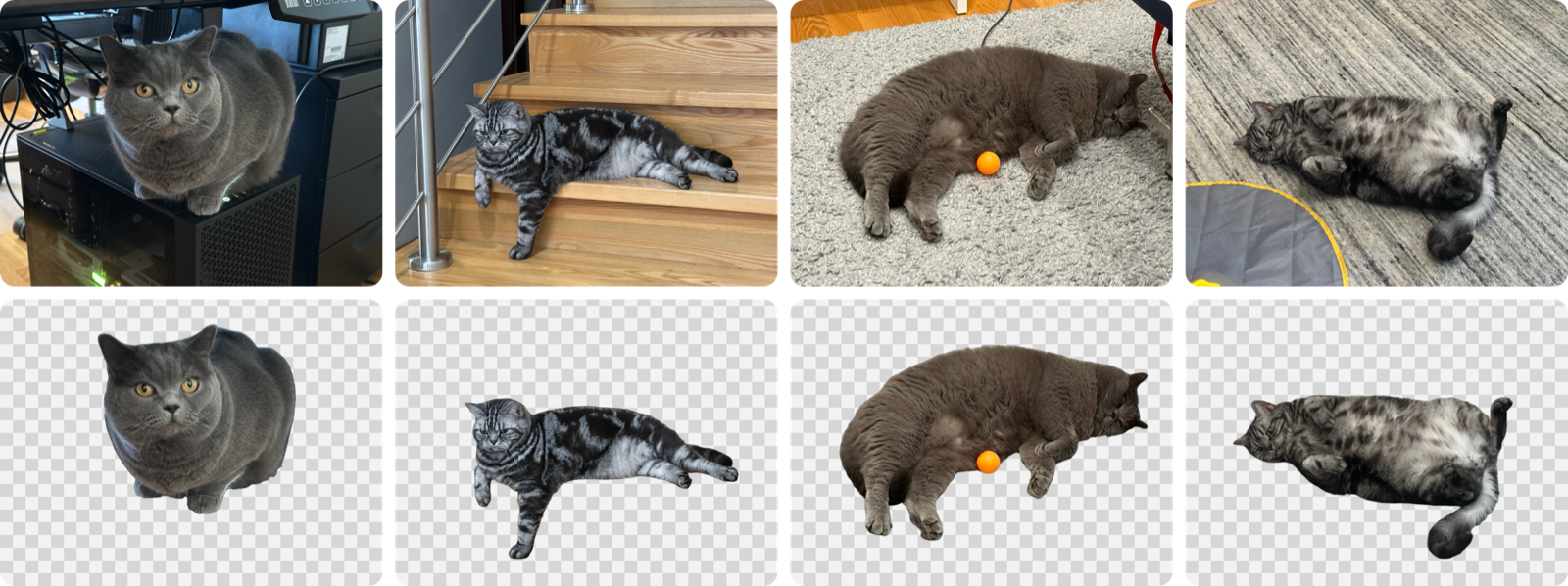
Eight photos in, eight transparent WebPs out, 32.3 MB lighter. JPEG, HEIC and a RAW DNG
all in one batch, cut out with BiRefNet on this Mac.
ffmpeg can do nearly anything, as long as you remember the flags. ffmep is the
flags, remembered. It uses stock macOS controls and Liquid Glass on macOS 26, so
it looks like something Apple could have shipped.
It also does a few things ffmpeg alone makes awkward: photos from an iPhone,
WebP in both directions, Live Photos, and cutting the subject out of a picture.
---
## Install
Download the DMG from the [latest release](https://github.com/TheFilipcom4607/ffmep/releases/latest),
open it, and drag ffmep to your Applications folder. It's signed and notarized, so it
opens on a double-click.
Or with Homebrew:
```bash
brew install TheFilipcom4607/tap/ffmep
```
Either way you need an Apple silicon Mac running macOS 14 or later. Homebrew also puts
the `ffmep` command on your PATH; from the DMG, link it yourself:
```bash
sudo ln -sf /Applications/ffmep.app/Contents/MacOS/ffmep /usr/local/bin/ffmep
```
### Building it yourself
From a clone of this repo:
```bash
scripts/build-ffmpeg.sh
```
```bash
VERSION=1.0.0 scripts/make-app.sh
```
The first script builds a static arm64 ffmpeg and ffprobe into `vendor/`. It takes
a while the first time, and re-runs skip whatever already finished. It needs the
Xcode command line tools and `brew install cmake meson ninja pkgconf`.
The second builds the app, bundles that ffmpeg, signs it and writes
`build/ffmep.app` and `build/ffmep.zip`. Use `CONFIG=debug` for a debug build in
`build/debug/`. Build with the macOS 26 SDK or newer to get Liquid Glass.
A build of your own isn't notarized, so Gatekeeper stops the first launch: right-click
`ffmep.app`, choose **Open**, and it starts normally from then on.
To use the Shortcuts action, the app has to be signed with an Apple developer
certificate, because macOS won't run App Intents from an ad-hoc signed app. A free
Apple ID gives you one: in Xcode, open **Settings → Accounts**, add your Apple ID, then
**Manage Certificates → + → Apple Development**. `make-app.sh` finds that certificate by
itself, or you can name one with `SIGN_IDENTITY`.
If `security find-identity -v -p codesigning` still says 0 valid identities, your keychain
is missing the intermediate certificate that signed yours. Install **Worldwide Developer
Relations - G3** from [Apple's certificate page](https://www.apple.com/certificateauthority/)
(G3, not G6).
---
## What it does
- **Video** to MP4, MOV, MKV, WebM or GIF, as H.264, HEVC, ProRes, VP9 or AV1.
H.264, HEVC and ProRes go through VideoToolbox when the Mac has a hardware
encoder for them, so they finish in a fraction of the time.
- **Audio** to MP3, AAC, WAV, FLAC, ALAC or Opus, including pulling the soundtrack
out of a video.
- **Images** to WebP, JPEG, PNG or HEIC, or **Same as Original** to just make them
smaller: JPEGs stay JPEG, HEICs stay HEIC. Anything ImageIO can open goes in,
RAW DNGs included. JPEG, PNG and HEIC are written by ImageIO directly, WebP by
the bundled ffmpeg.
- **A file size instead of a quality.** Turn on **Limit File Size**, type 10 MB,
and ffmep works out the bitrate that fits. Or skip it and use the slider, with
Small, Balanced and High to start from.
- **Resize, rotate, flip, change the frame rate**, or squeeze out every last byte
with maximum compression.
- **Presets** for the things you do often. It comes with ones for Discord, WhatsApp
and email size limits, ProRes for editing, web images, Discord emoji and more,
and you can save your own from the inspector.
- **Your own file names**, like `{name} (web)` or `{date} {name}`.
- **Shortcuts actions** for Convert Images, Convert Videos, Convert Audio and Remove
Background, each with its own format, quality, size, metadata and save folder
settings, plus Convert Files for your presets. They hand the converted files to the
next step. They need a signed build, see [Install](#install).
- **A command line** that does everything the app does, for scripts and AI assistants:
`ffmep convert clip.mov --to mp4 --max-size 25MB`. Every command takes `--json`, and
`--dry-run` shows the ffmpeg commands first. See [docs/cli.md](https://github.com/thefilipcom4607/ffmep/blob/HEAD/docs/cli.md).
- **A queue that keeps moving.** Images, audio, hardware video and software video
each get their own lane with their own limit, so a slow AV1 encode doesn't hold
up a folder of photos.
- **Save next to the originals**, into a folder, or replace the originals. Replaced
files go to the Trash, and only once the new file is safely written.
### Same as Original
Sometimes you don't want a new format, just a smaller file. Pick **Same as Original** at
the top of the image **Format** menu and every photo stays what it was: JPEGs stay JPEG,
HEICs stay HEIC, WebPs stay WebP. Everything else still applies, so a JPEG can stay a JPEG
but come out under 500 KB with its location removed:
```bash
ffmep convert trip.jpg --to same --max-size 500KB --metadata remove-location
```
RAW, TIFF and other formats ffmep can't write become JPEG. PNG and GIF have no quality
to lower, so they barely shrink, and the file says so. The **Compress (Same Format)**
preset starts you off.
### Metadata
Photos and videos carry more than pixels: where they were taken, when, the camera
and its serial number, sometimes your name. **Metadata** has three settings:
- **Keep** everything, including the location and capture date iPhone videos keep in
Apple's own tags, which ffmpeg drops unless it's told not to.
- **Remove Location** takes out GPS and place names, and keeps the rest.
- **Remove All** takes out all of it.
Whichever you pick, each converted file says what it lost, like *Removed location,
date and serial number*. ffmep can't write metadata into WebP or GIF, so those
always lose it, and the file says so instead of leaving you to find out.
The tests convert geotagged photos and iPhone-style videos to every format and check
what's left in each file, so a leak shows up as a failing test.
### Live Photos
Drop in a Live Photo, the `.HEIC` and the `.mov` together, and it shows up as one
row with a Live Photo badge. Export the still, the motion as an MP4, or the motion
as an animated GIF.
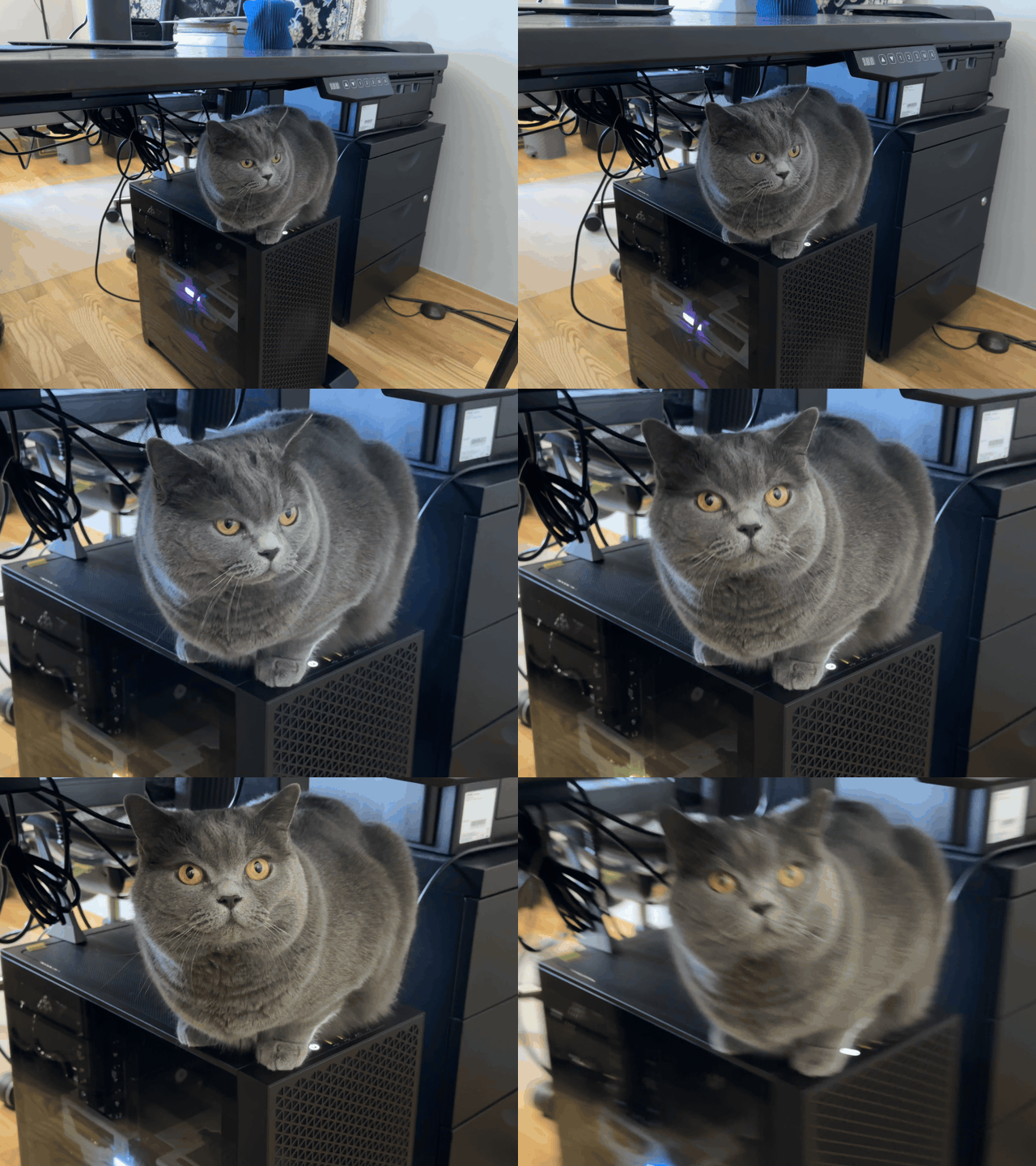
A Live Photo, exported as a GIF at 480p. No trimming, no Photos app, no third-party site.
### Background removal
Set **Background** to **Transparent** or **White** and ffmep cuts the subject out
before converting. Formats without transparency, like JPEG, get white instead.
It works straight away with Apple's Vision framework. The first time you use it,
ffmep offers to download [BiRefNet](https://github.com/TheFilipcom4607/birefnet-coreml),
a 408 MB Core ML model with much cleaner edges on fur, hair and anything thin.
Once it's installed, **Model** picks between the two for each conversion: BiRefNet for
the cleanest edges, or Apple Vision when speed matters more, since Vision is many times
faster. Either way it runs on your Mac, and the model can be removed again from Settings.
Top: the originals. Bottom: what BiRefNet kept. The railing, the cables and the rug all go,
the whiskers and the ball stay.
### Your files never leave your Mac
Every conversion, and background removal, runs on this Mac. No account, no analytics,
and nothing about your files is ever sent anywhere.
ffmep reaches the network in exactly two places, both optional. It downloads the
BiRefNet model only after you say yes. And once a day it asks GitHub whether a newer
version exists — just that question, carrying nothing but the version you're running.
Settings › General › Check Automatically turns it off, and then ffmep makes no
network connections at all.
### The bundled ffmpeg
ffmpeg 9.0.1, static, arm64, linking nothing but system libraries. Built with
x264, x265, SVT-AV1, libvpx, Opus, LAME, libwebp and dav1d, plus VideoToolbox and
AudioToolbox. Exact versions are in [`vendor/BUILDINFO.txt`](https://github.com/thefilipcom4607/ffmep/blob/HEAD/vendor/BUILDINFO.txt).
Prefer your own? Settings can switch to Homebrew's ffmpeg or any path you like.
---
## Formats
| Put in | Get out |
|---|---|
| **Video**: anything ffmpeg reads, like MOV, MP4, MKV, WebM, AVI or an animated GIF | MP4 (HEVC, H.264), MOV (HEVC, H.264, ProRes), MKV (HEVC, H.264, AV1), WebM (VP9, AV1), GIF, or any audio format |
| **Audio**: anything ffmpeg reads, like MP3, AAC, WAV, FLAC, ALAC, Opus or OGG | MP3, M4A (AAC), WAV, FLAC, ALAC, Opus |
| **Images**: anything macOS opens, like HEIC, JPEG, PNG, WebP, TIFF or RAW, plus what ffmpeg decodes | WebP, JPEG, PNG, HEIC, GIF |
That's the whole list. If you need a conversion that isn't on it, or a file ffmep won't
open, [open an issue](https://github.com/TheFilipcom4607/ffmep/issues/new?template=conversion-request.yml).
---
## When to use something else
ffmep is small on purpose. Reach for something else when:
- **You're on an Intel Mac, or on macOS 13 or older.** ffmep needs Apple silicon and
macOS 14.
- **You need to edit, not convert.** There's no trimming, cropping or joining.
- **Your video has subtitles or several audio tracks.** Subtitle tracks are dropped.
MOV and MKV keep every audio track, but MP4 and WebM keep only the first.
[HandBrake](https://handbrake.fr) handles subtitles and tracks well.
- **You want to tune the encoder.** ffmep gives you a quality slider or a file size.
HandBrake has far more settings, and ffmpeg itself has all of them.
- **You need a GIF under a set size.** GIF has no file size limit yet. A smaller size
and frame rate help, but ffmep can't aim for a number.
- **Your audio has cover art you want to keep.** Converting audio drops it.
- **It isn't video, audio or an image.** Documents, PDFs and archives are out of scope.
- **You want it in another language.** It's English only for now.
---
## Development
```bash
swift test
```
The integration tests run real conversions and are skipped unless you point them
at a folder of sample files:
```bash
FFMEP_FIXTURES=/path/to/fixtures swift test --filter IntegrationTests
```
They use the ffmpeg in `vendor/` by default, or Homebrew's with `FFMEP_FFMPEG=homebrew`.
The metadata tests make their own sample files, so they run whenever `vendor/` has
an ffmpeg.
`make-app.sh` also fixes one thing SwiftPM gets wrong for this app. SwiftPM records
the deployment target as the SDK version in the binary, and macOS 26 then runs the
app in legacy appearance mode, without Liquid Glass. The script writes the real SDK
version back in with `vtool`.
It also makes the Shortcuts action visible. Shortcuts reads a `Metadata.appintents`
bundle that Xcode normally generates, and SwiftPM doesn't, so the script runs Apple's
`appintentsmetadataprocessor` on the constant values the compiler writes out.
`scripts/release.sh VERSION` cuts a release: it builds through `make-app.sh`, stages the
app next to an `/Applications` symlink in a DMG, notarizes it with the `ffmep-notary`
keychain profile, staples the ticket, checks the stapling on both the image and the app
inside it, and prints the sha256 the Homebrew cask needs. It needs a Developer ID
Application certificate and `xcrun notarytool store-credentials ffmep-notary`.
The BiRefNet conversion scripts live in [`scripts/birefnet`](https://github.com/thefilipcom4607/ffmep/blob/HEAD/scripts/birefnet), with
usage notes at the top of `convert.py`.
---
## License
GPLv3, see [LICENSE](https://github.com/thefilipcom4607/ffmep/blob/HEAD/LICENSE). The bundled ffmpeg is built with `--enable-gpl` and
`--enable-version3`, so it is GPLv3 too. Its license files are in
[`vendor/licenses`](https://github.com/thefilipcom4607/ffmep/blob/HEAD/vendor/licenses).
## Related projects
- [Wattson](https://thefilip.com/projects/wattson) (Mac battery and power monitor for the menu bar): A free Mac menu bar app that shows what your MacBook battery is really doing: power use in watts, where every watt goes, and what’s plugged into each USB-C port.
- [TABOR](https://thefilip.com/projects/tabor) (Bus and tram spotting app for Warsaw): A free iPhone app for spotting Warsaw’s buses and trams, like a Pokédex: point the camera at one and its fleet number becomes a sticker. Almost 2,700 to catch.